
Create & Apply
Analyze & Prepare
Free Tools
All Free Tools
Browse keyword extractor, ATS checker, bullet rewriter, and more
Keyword Extractor
Extract skills and keywords from any job description
ATS Resume Checker
Check resume keyword match against a job description
Bullet Rewriter
Rewrite resume bullets with stronger impact
Summary Generator
Generate professional resume summary variants
Build your perfect tailored CV
Join thousands of professionals landing more interviews with AI-powered resumes.
Popular Roles
See real resumes that get interviews
Browse examples across every industry and role to inspire your own.
Find your perfect template
Professionally designed layouts ready to tailor to any job.
Learn & Explore
May 22, 2026
·9 min read
Best Resume Format in 2026 (With Examples)
The best resume format should highlight your best achievements and experiences. Most resumes get scanned in under 10 seconds. And the way you structure it will decide whether you capture the hiring manager’s attention among competitors.
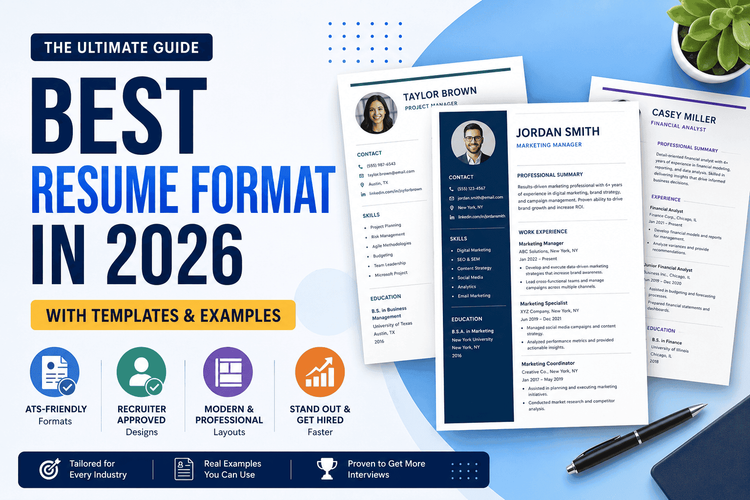
The best resume format should highlight your best achievements and experiences. Most resumes get scanned in under 10 seconds. And the way you structure it will decide whether you capture the hiring manager’s attention among competitors. Your main goal should be to create it in a way that is scanable and concise, showing employers why you’re the best fit for the job.
To pass ATS systems and land more interviews, this guide will help you choose the best format for your resume, including spacing, font styles, sizes, and other important details, with common examples based on your career.
The Three Main Resume Formats
There are three common resume formats that will help you present your skills, strengths, and achievements based on your experience level and work history.
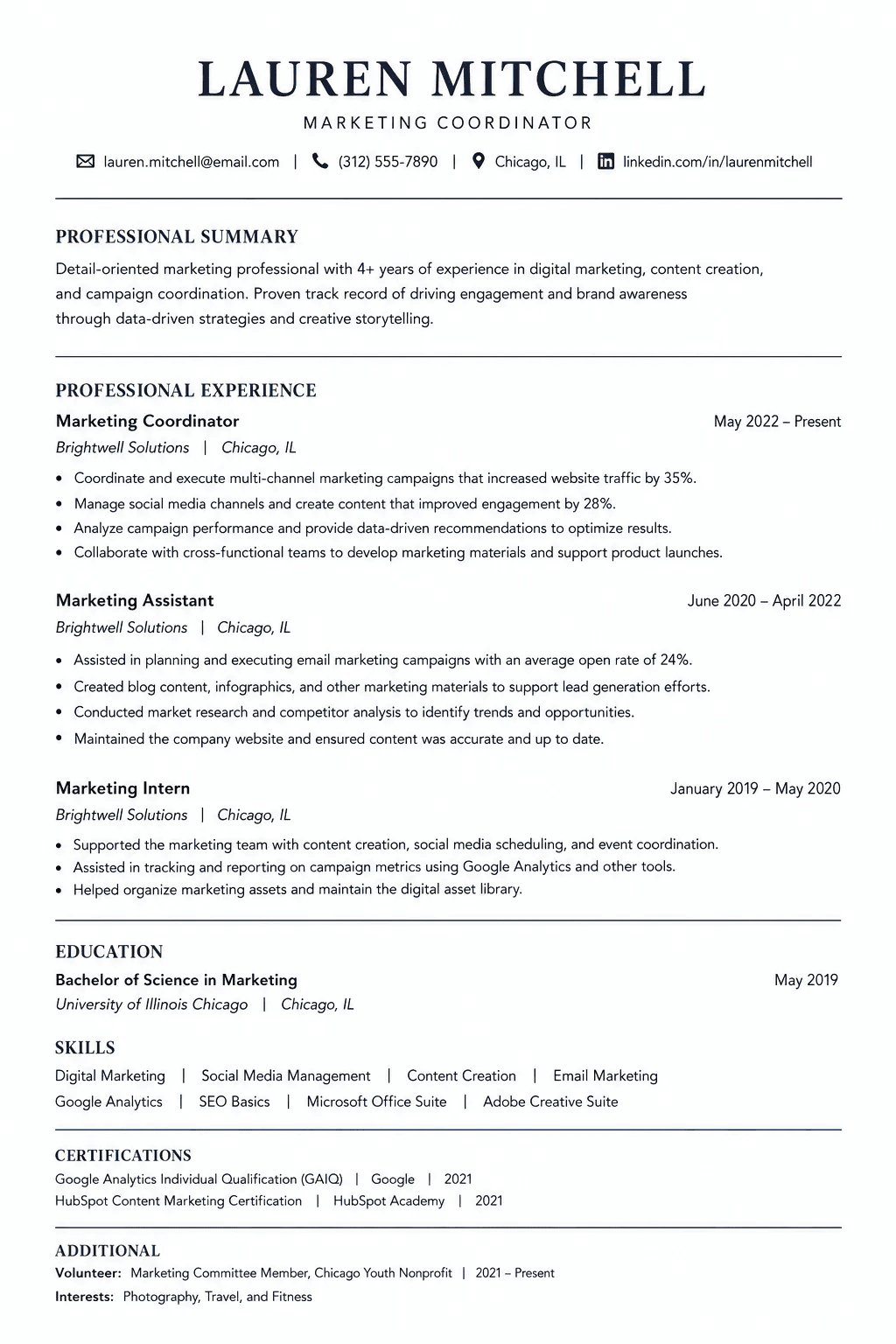
1. Chronological Resume Format
This is the most commonly used resume format, making it highly recognizable to recruiters and hiring systems. It is easy to understand and scan your resume. The main focus of this format is your work experience, and this is what matters most when applying for a job.
How to write in chronological order
The common pattern is as follows:
- Resume heading - include your name, contact information, LinkedIn profile, or other portfolio.
- Resume summary - write a short professional summary to highlight your key achievements in 2-3 sentences.
- Experience section - list all your work experience, starting with your most recent job. For each position, include the job title, employer name, dates of employment, and the most relevant job skills in several bullet points.
- Skills section - list any soft and hard skills you have gained that align with the job description. These act as the keywords hiring managers look for to scan your resume.
- Education section - include your highest degree first, with the institution’s name, location, and dates. If you have just graduated, mention that higher in your resume and add relevant work, activities, or awards to help your resume stand out.
Best for: The chronologically formatted resume is ideal if you have a steady, continuous work history. It is great if you have several years of experience in the same field, or another role that really showcases your progress.
2. Functional Resume Format
The main focus in a functional resume format is the skills, rather than the work experience. Instead of listing the work history chronologically, it highlights your skills relevant to the job position you are applying for. This is a less familiar format for recruiters and ATS systems, but it can be useful if your experience does not align with the role.
How to write in functional format
Include important sections in this order :
- Personal information - include your full name, contact information, and portfolio.
- Summary statement - write 2-3 sentences to express your career goals, rather than explain your key achievements.
- Skills - Group your experience into 3 or 4 skill categories. Under each, include 3-4 bullet points to highlight your specific achievements and how you used these skills.
- Work history - present your previous roles with job titles, employer's name, dates of employment, but without the detailed descriptions for each role.
- Education - include relevant degrees, certifications, or licenses earned.
Best for: The functional resume format is best if you have shifted careers or have gaps in your work experience. It will help highlight your qualifications and transferable skills, rather than showing your previous roles, which may be irrelevant to the job you are applying to.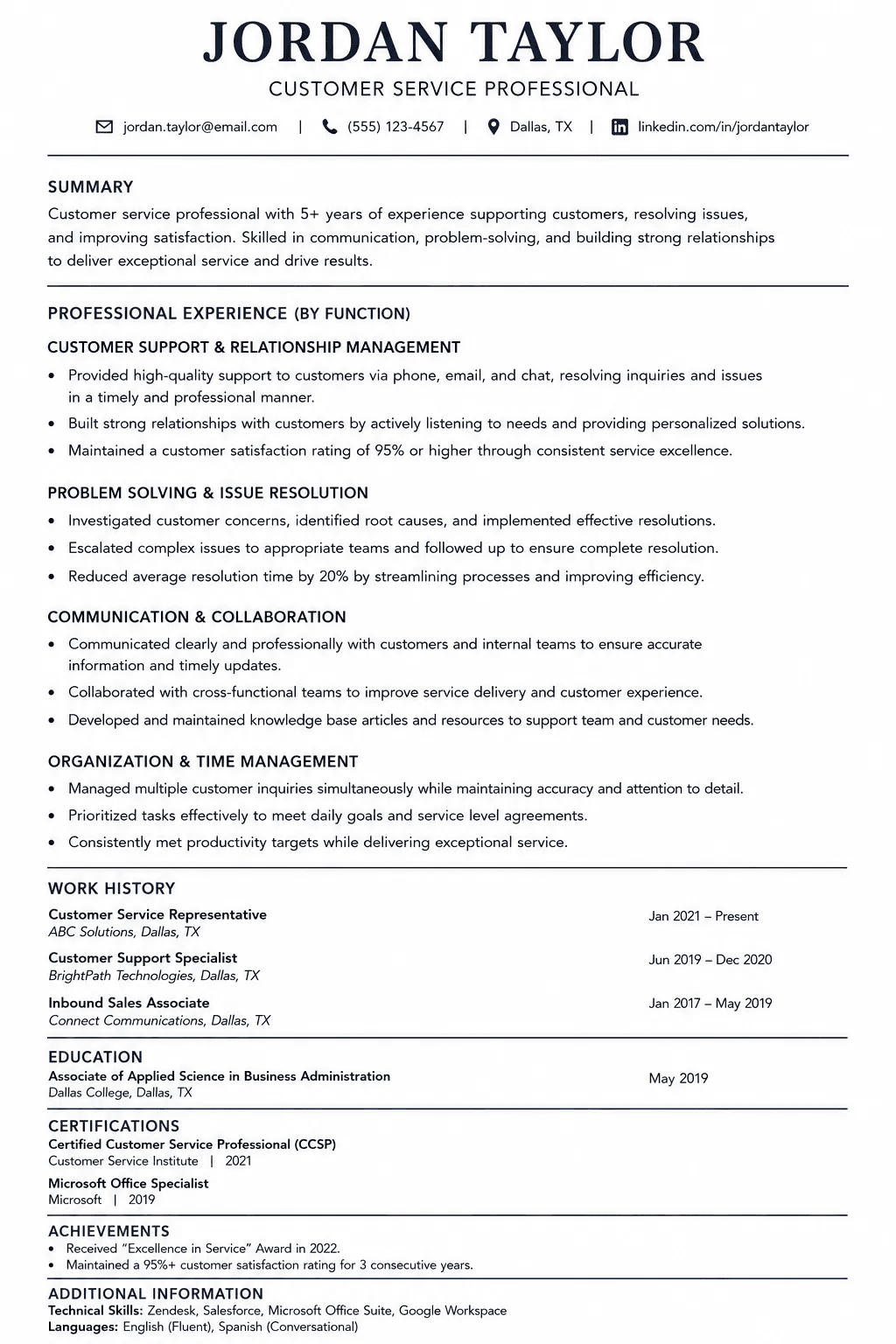
3. Combination (Hybrid) Resume Format
The combination resume format, as the name suggests, combines the chronological and functional formats. It includes your skills and work experience equally. This can be a long and complex resume, which requires more time to structure it in a way to be clear and easily scannable for ATS systems and recruiters. However, it allows you to highlight both your strengths and achievements for different roles.
How to structure a combination resume format
Follow this order when writing your resume in a hybrid format:
- Header - include your name, contact information, LinkedIn profile, or other portfolio.
- Professional summary - write 2-3 sentences about your career goals.
- Skills section - group 3 to 4 core capabilities and use specific bullet points to describe your expertise.
- Work experience - make a reverse-chronological list of your past jobs. Add the company’s name, dates, titles, and quantify your achievements.
- Education - include your degree, certifications, or awards at the end of the resume.
Best for: This resume format is ideal if you have strong trong professional skills and experience, have transitioned between roles within the same or a related field, or want to balance both skills and work history to present a complete professional profile.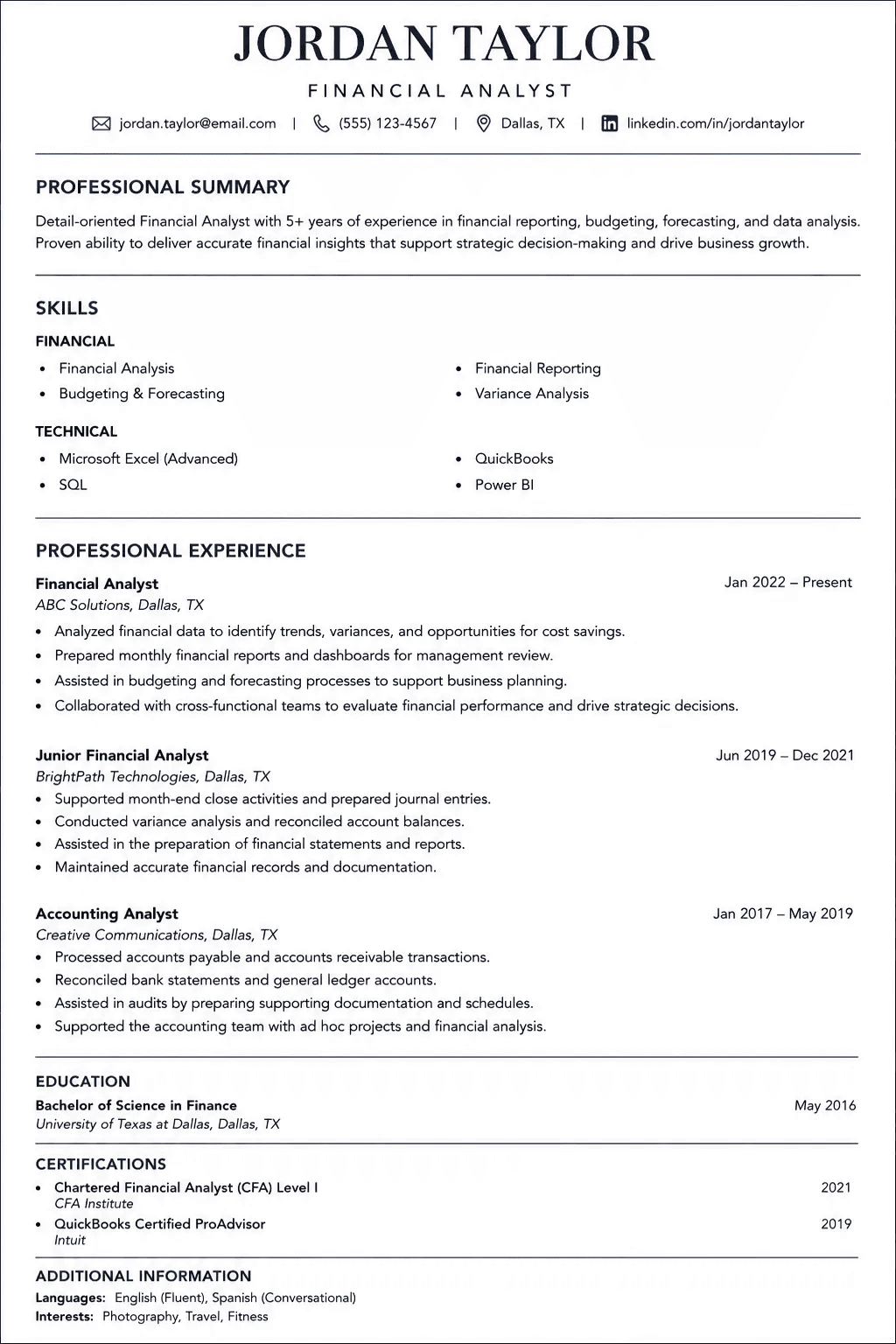
How to Choose the Best Resume Format for You
Take a look at this quick decision table:
| Situation | Best Resume Format |
|---|---|
| Steady career history | Reverse-Chronological |
| Career changer or employment gaps | Functional or Combination |
| Senior professional with strong skills | Combination |
| Recent graduate | Chronological or Functional |
| Beginner / little to no experience | Functional (or simple Chronological if education is strongest) |
How to Structure the Best Resume Format (ATS and Readability)
Even if you have the most impressive career and skills, your resume might never reach hiring managers if it is not structured properly. Here are some good resume tips that will help you structure your resume to pass the ATS systems.
Pick a Single-Column Layout
Most ATS software reads your resume like a book, left to right, top to bottom. While a two-colomns layout may be fancier, a single-column resume is ATS-friendly and easier to skim.
Use the Standard Headings
Include the sections using the standard listing, like Professional Summary, Work Experience, Education, Skills, etc.
If you rename, for example, “Work experience” into “My job Journey”, the system may not recognize this section and skip it.
Use Professional Font Styles and Sizes
There is no room for being fancy here. Keep it clear and professional and use a common font style such as Calibri, Arial, Georgia, or Cambria. Here's a quick size guide to follow:
| Element | Recommended Size |
|---|---|
| Name | 18–24 pt |
| Section Headings | 12–14 pt |
| Body Text | 10–12 pt |
| Bullet Points | 10–12 pt (same as body text for consistency) |
Margins and Spacings
Writing everything together to fit into one page makes your resume harder to skim, and recruiters are skimming, not reading.
The sweet spot for margins is 1 inch on all sides. For line spacing, 1.0 to 1.15 keeps things open and readable without wasting space. If you're pushing content to a second page, slightly tightening margins to 0.75 inches is acceptable, but don't go below 0.5 inches.
Be Concise
Make your resume one page. Keep all your ideas clear and concise, and avoid irrelevant information. If you have more than 10 years of experience, two pages are acceptable.
Reduce unnecessary spacing or word tightening by:
- Removing filler words like “a”, “and”, “that”, “which”
- Combine two similar points into one
- Adjust the spacing between sections
For example:
"Led a social media campaign by developing and creating original content across multiple platforms, including Instagram, Facebook, and LinkedIn, which resulted in increased audience interaction by 35% and brand visibility by 20%.”
Can be tightened to:
“Led social media campaign by creating content and managing engagement, increasing audience interaction by 35% and brand visibility by 20%.”
Be Careful With Font Styling
Be consistent with font styling throughout the document. Use bold for section headings and job titles, and italics for supporting details such as company names, locations, or dates. Avoid overusing styling to maintain a clean, minimalist resume.
Saving in PDF vs. Word
Save your resume as a PDF file. It preserves your formatting exactly as you designed it across any device. However, if a job posting specifically asks for a .docx file, follow their instructions.
And also one small important tip: name your file professionally, like “Jane_Smith_Resume_2026.pdf”, not “resume_FINAL_v3_USE_THIS.pdf”.
Other Resume Formats to Consider
Beyond the three main resume formats, there are other alternative formats that might actually serve you better depending on your job.
- Classic resume: A traditional format built around clean typography, simple structure, and black-and-white styling. Works exceptionally well in conservative industries like law, finance, government, and healthcare, where professionalism is expected over creativity.
- Modern resume: A step up from classic, it features a clean header bar, a slightly more contemporary layout, and is ATS-friendly. It is a strong choice for corporate, tech, marketing, and other similar roles.
- Creative resume: More designed-focused format that uses bold typography, color, visual hierarchy, and sometimes graphics or illustrations to make a strong first impression. Best suited for roles where design sense is part of the job, including designers, UX/UI designers, art directors, and similar.
How to Format Your Resume With TailoredCV
Choosing the best resume format to apply for your dream job is crucial for passing today’s ATS filters. Knowing which format to use is what actually gets you noticed. Whether you’re going with a classic chronological format, the functional format, or a combination of both, the fundamentals remain the same: clear structure, ATS-friendly structure, and content tailored to the job description.
And instead of spending hours structuring the margins, spacing, and defining the font style, select one of the top resume templates that TailoredCV offers, and create your resume with ease.
FAQs
What is the best format for a resume?
The best resume format depends on your work experience and career goals. If you have a steady work history - choose the chronological format; if you have gaps or are changing careers - the functional or combination format is the right fit.
Are these resumes formats ATS-friendly?
Yes, all three resume formats can pass the ATS systems if they are correctly formatted. Use clear headings, clean fonts, and concise bullet points. Of the three, the reverse-chronological format is the most reliably ATS-friendly.
Which format do most employers prefer?
Most employers prefer the reverse-chronological resume format because it presents your work experience in a clear, familiar timeline that’s easy to scan quickly.
How do I choose the best resume template?
Choose the best resume template based on your career level, the role you are applying for, and the industry’s expectations. Whichever format you choose, structure it as a one-page resume, clear and understandable. The creative templates work for more creative jobs. However, if you have doubts, prioritize ATS compatibility over design.
How do I format a resume for ATS?
To format your resume, start with the basics:
- A single-column layout
- Section headings, including “Work Experience”, “Skills”, “Education”, etc.
- Use a clean font like Calibri or Arial, with the right size 10-12 pt.
- Tailor it to different job descriptions.
- Save it as a PDF or a .docx if strictly mentioned.
Marija K.
LinkedIn ↗Legal Consultant & HR Specialist
Marija is a seasoned legal consultant and HR specialist with a passion for helping professionals craft standout CVs and navigate complex career transitions.
Ready to tailor your resume?
Let AI match your resume to any job description in seconds — and land more interviews.
Get started free →